How To: Completely disassemble the Apple iPad for repairs

How To: Completely disassemble the Apple iPad for repairs
So, you've just got yourself an Apple iPad, but it already needs fixed, or you want to check the innards out for yourself, you're going to have to know how to open that sucker up. This video tutorial will show you how to do just that. Learn the whole teardown procedure for the iPad and see what it takes to disassemble the Apple iPad Wi-Fi, model number A1219. There's 8 videos in this how-to, so check them all out. Video 1: Opening the iPadVideo 2: Removing the I/O CableVideo 3: Logic Board RemovalVideo 4: Removing the Headphones ModuleVideo 5: Removing the Volume and Screen Hold ButtonsVideo 6: Removing the Speaker AssemblyVideo 7: Removing the Battery from the Back CaseVideo 8: Removing the LCD and Digitizer PowerBook Medic is the ultimate resource for Mac computers and electronics repair. They have helpful tutorials on most Apple products including the MacBook, MacBook Pro, PowerBook, iBook, iPhone, iPod, iPad, and more, covering topics from disassemblies, to RAM upgrades, to replacement hard drives. For more information on the iPad teardown procedure, check out the iPad Repair Guide Service Manual on PowerBook Medic. Please enable JavaScript to watch this video.Please enable JavaScript to watch this video.Please enable JavaScript to watch this video.Please enable JavaScript to watch this video.Please enable JavaScript to watch this video.Please enable JavaScript to watch this video.Please enable JavaScript to watch this video.Please enable JavaScript to watch this video.(1) Part 1 of 8 - How to Completely disassemble the Apple iPad for repairs, (2) Part 2 of 8 - How to Completely disassemble the Apple iPad for repairs, (3) Part 3 of 8 - How to Completely disassemble the Apple iPad for repairs, (4) Part 4 of 8 - How to Completely disassemble the Apple iPad for repairs, (5) Part 5 of 8 - How to Completely disassemble the Apple iPad for repairs, (6) Part 6 of 8 - How to Completely disassemble the Apple iPad for repairs, (7) Part 7 of 8 - How to Completely disassemble the Apple iPad for repairs, (8) Part 8 of 8 - How to Completely disassemble the Apple iPad for repairs


Download BIAS AMP 2 - for iPhone and enjoy it on your iPhone, iPad, and iPod touch. BIAS AMP 2 Mobile is a professional virtual amp designer that offers replications of 36 of the best vintage, modern and boutique amps in rock.
iPhone Hacks | #1 iPhone, iPad, iOS Blog


Get free Hulu shows in 2019. How to watch free Netflix hulu and amazon prime shows in 2019 Free netflix in 2019 free hulu shows in 2019 . How To watch all these three channel for Free Their is channel on Youtube Hollywood Hubz which upload all Tv shows latest movies
Netflix vs. Hulu Plus vs. Amazon Prime Comparison


When you hear the music or the voice from a YouTube video, you may want to extract the audio. Here you will learn how to do it easily. You can extract the audio online or with a video converter ().
Best 2 Methods to Extract Audio from YouTube Video


Three Apps to Combine All Your Messaging Clients Into One among them Facebook Messenger, WhatsApp, Slack, Telegram, WeChat, Skype, HipChat, Google Hangouts, GroupMe, Steam Chat, and more
Is there an app or service that integrates WhatsApp, Telegram


If you always carry earbuds with you in your purse or backpack, you can use simple household objects to prevent the cords from tangling up into knots. For a super-easy solution, simply place your earbud cords in a prescription bottle, a travel-sized Q-tip container, or an empty Altoid tin.
Wrap Earbuds Over Your Ear to Keep Them from Falling Out


The phone is great and silky smooth so far but my biggest gripe and I know this is something I could become accustomed too if I had too but I was hoping that maybe there was an easy way to swap the placement of the two buttons. On Samsung's the back button is on the right and the recent apps button on the left.
Android Basics: How to switch the placement of the recents

Quick Tip: Speed Up Gboard Performance on Android by


Start your free trial to watch Star Trek: The Original Series and other popular TV shows and movies including new releases, classics, Hulu Originals, and more. It's all on Hulu.
Videos | Star Trek


This how-to video walks you through how to connect Bluetooth devices to an iPhone, iPad, or iPod Touch.
How to Sync an iPod to a Bluetooth Device | It Still Works

CES 2015: These Headbands Are Really Comfortable Headphones


When you start your route, the directions will take you right to where Find My iPhone last located your lost iPhone, even if the device is dead. How to Find Your iPhone (Even If It's Dead) on a Computer. I imagine most people will end up looking for their lost and potentially dead iPhone on the computer.
This setting makes it easier to find your iPhone when it is

How To: Enter DFU Mode on an iPhone XS, iPhone XS Max, or iPhone XR in iTunes

How To: Enter DFU Mode on an iPhone XS, iPhone XS Max, or iPhone XR in iTunes
Following in the iPhone X's footsteps, the iPhone XS and XS Max, as well as the iPhone XR, have all ditched the iconic Home button last seen on the iPhone 8 and 8 Plus, which is one giant leap toward Jony Ive's ultimate vision of an iPhone that's a clean slab of glass. However, without the Home button, a lot of tasks have changed, most notably, entering and exiting DFU mode in iTunes.DFU mode, which stands for "Device Firmware Upgrade" mode, is often the last resort when restoring a bricked or malfunctioning iPhone back to its factory settings. You may even never need to use DFU mode on your iPhone since iOS is fairly stable overall, but you should still know how to use it should any iPhone emergency ever arise. At least being aware that DFU mode exists is a step in the right direction.Don't Miss: How to Shut Down & Restart the iPhone XS, XS Max & XR When it comes to entering DFU mode on an iPhone XR, XS, and XS Max, it's just like doing so on the iPhone 8, 8 Plus, and X. If you're upgrading from an iPhone 7, 7 Plus, or earlier model, the DFU process is a tad more complicated than merely substituting the Home button with the Volume Down key, so bookmark this page should you ever need to use it on your new Home button-less iPhone model.
RequirementsMac or Windows computer latest version of iTunes installed Lightning to USB or Lightning to USB-C cable
WarningRestoring via DFU mode will totally erase everything on the device, so be sure to back up your iPhone through iTunes or iCloud — if even possible — to preserve any important data you can't live without. Fortunately, it's very easy to exit DFU mode before completely wiping your device, so if you change your mind halfway through, you can back out and make a backup if the iPhone is up to the task.
Step 1: Connect Your iPhone to Your Mac or PCUsing either your Lightning to USB or Lightning to USB-C cable, connect your iPhone to your Mac or PC. The iTunes program should automatically launch on your computer, but if not, manually launch the app as you normally would, then make sure your iPhone is connected (you should see the phone icon in iTunes appear next to the media dropdown as well as under "Devices" in the sidebar).If you see the "Unlock iPhone to Use Accessories" notification appear, you'll need to unlock your iPhone first before proceeding. Also, if this is your first time connecting to iTunes, you may have to trust your computer as well.Don't Miss: Disable the 'Unlock iPhone to Use Accessories' Alert on Your iPhone
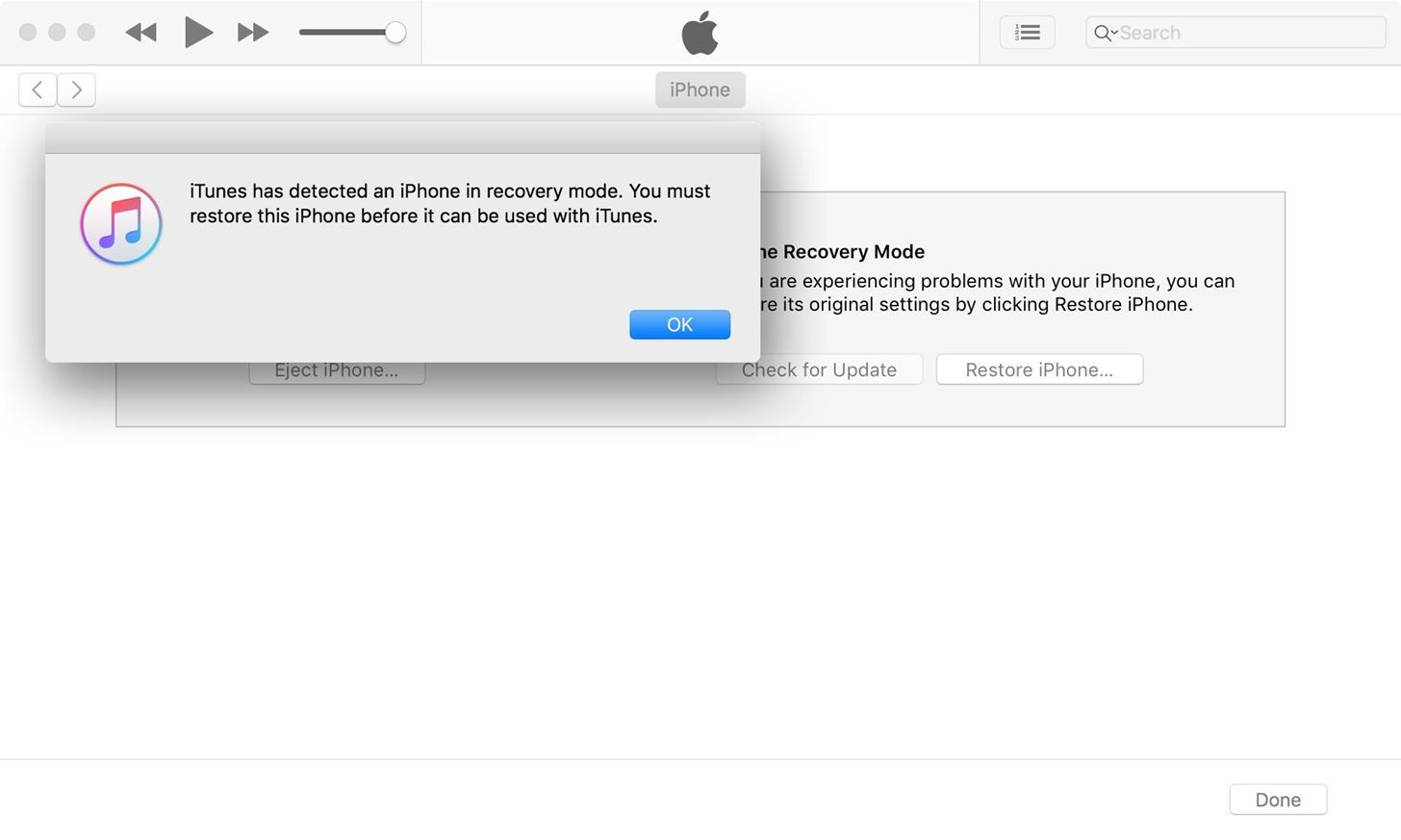
Step 2: Boot Your iPhone in DFU ModeWith your powered-up iPhone still connected to your computer with iTunes open, perform the following in order.Quick-press the Volume Up button. Quick-press the Volume Down button. Press and hold the Side button until the screen goes black. Release the Side button once the screen blacks out, then ... Quickly press and hold both the Side and Volume Down buttons together for 5 seconds. After 5 seconds, release the Side button without letting go of the Volume Down button. Continue holding down the Volume Down button for at least 5 seconds. The key to that final step above is to pay close attention to your computer — if an iPhone recovery prompt from within iTunes pops up, release the Volume Down button and check your iPhone's display. If the screen is black, it means you've successfully entered DFU mode.
TroubleshootingIf the iPhone restarts or enters recovery mode (by displaying "Connect to iTunes" on the screen) instead of just having a black screen, you'll have to start over at Step 1. For the second time, try reading the procedure beforehand so you're more familiar with the steps involved, which will lead to a more successful attempt.
Exiting Out of DFU ModeAccidentally putting your iPhone into DFU mode is not unheard of. When I was a repair tech, I would see countless devices where the only "fix" needed was exiting DFU mode. With its new button combination, however, the likelihood of entering DFU mode without you knowing has been reduced to a near impossibility.But in the event that you put your iPhone XR, XS, or XS Max into DFU mode — whether done inadvertently or not — and want to get out, you can safely exit the black screen by simply restarting the device.Quick-press the Volume Up button. Quick-press the Volume Down button. Press and hold the Side button for at least 10 seconds — until you see the Apple boot screen. After that, iOS 12 should start up, and you'll be prompted to enter your passcode before being able to unlock the iPhone.
Step 3: Restore Your iPhone Back to Factory SettingsNow that you've successfully booted up your iPhone into DFU mode and don't want to back out, you can hit "OK" to close the iTunes recovery prompt and proceed to restore it back to factory settings. In iTunes, select "Restore iPhone" under iPhone Recovery Mode. Once it's successfully restored, your iPhone XR, XS, or XS Max will automatically exit out of DFU mode and boot up to its initial activation screen.Don't Miss: 100+ Coolest New iOS 12 Features You Didn't Know AboutFollow Gadget Hacks on Facebook, Twitter, YouTube, and Flipboard Sign up for Gadget Hacks' daily newsletter or weekly Android and iOS updates Follow WonderHowTo on Facebook, Twitter, Pinterest, and Flipboard
Cover image and screenshots by Justin Meyers/Gadget Hacks


Now in Windows 10, this feature is a lot more robust, with the ability to choose to have an app show detailed status information on the lock screen. In addition, you can also choose from up to seven apps to show quick status updates.
How to Retain Swipe to Unlock Effects with Lock Screen

How to Get the Moto X Camera App on Your Android Phone


Watch Youtube Videos Without Internet #1 Discover relatable videos on the Home Screen: On the home screen of the Youtube GO app users can easily find up the trending as well as popular videos, therefore, you won't feel it like any other app but love to use it as a great new Youtube app replacement as the official Youtube app also has similar looks that this app have provided.
Watch YouTube Videos Without Internet - YouTube


News: Android's Best Build.Prop Tweaks for Better Speed, Battery Life, & Customization By Galaxy S8+ Battery Life Is Very Good, but Not Better Than iPhone 7 Plus
15 Best Android Tweaks You Can Do Without Rooting Your Phone


The Barnes and Noble Nook Simple Touch with Glowlight is the second iteration of their Simple Touch e-reader line. With the advent of any new device the previous generation often goes down in price.


Jumping Netflix regions used to be one of the best things about Netflix. You'd simply throw a switch and you'd have a massive library of content that wasn't previously available to stream. In recent years, Netflix has stamped down on VPN usage but recently, we've seen lots of sites once
Mullvad VPN not Working with Netflix? Here's What You Should Do


LED Music Sync / How to Make LEDs Dance to Music [EASY!!] : Please watch this video to learn how to make this AWESOME projectplease tell me guys if you think I should do another tutorial how to control the Lamps in your room/ house and make them react to music SUBSCRIBE FOR MORE AWESOME PROJECTS
Make your LEDs dance to the beat of music - oznium.com


With this DIY parabolic microphone from the folks over at GBPPR, you can listen in from a distance and do your sleuthing without ever leaving the couch. Image via sourcedns.com A parabolic microphone uses a parabolic reflector to focus sound waves onto a receiver.


How to Check the Battery Status on a Samsung Galaxy Device. Battery life is one of the most important aspects of a cell phone. No one wants to spend the day attached to an outlet waiting for a smartphone to charge.
GI Joe's: Hooking up Cb radios, 10 meter radios and amplifiers.


Blog For Latest Tips & fixes for iPhone, iPad, Apple Watch, Mac, iOS, macOS Problems. Apps, Software, accessories reviews, news, Deals, Tutorials in Video.
Binance 101: How to Install the Mobile App on Your iPhone


There are 4 major carriers, only OI has RCS, Vivo (Telefonica) is going to launch very soon, Claro (America Movil) and TIM have no idea about launching RCS. Ah, and for dual sim devices, once I tested in a moto G4 , i had to set it up with only one sim, after everything was right, it worked fine. Mobile data for the sim you have rcs.
Everything you need to know about RCS messaging


If you're having problems getting into your account, try changing your privacy settings. Check your browser. If you have your browser's privacy settings set to "High," add

How to turn off (or turn on) landscape mode on the iPhone 6/6s Plus and iPhone 7 Plus home screen With a big display comes a home screen that can switch modes.
Get the iPhone 6 Plus' Resolution & Home Screen Landscape

Messages 101: How to Send a Friend a Map to Your Current Location or Let Them Track You While Moving

Messages 101: How to Send a Friend a Map to Your Current Location or Let Them Track You While Moving
You're at the bar, but your friend can't find you. You could call them, but that wouldn't feel very 2018. Instead, let your iPhone do the talking. Right in the Messages app, you can easily send your friend your current location — all without interrupting the friends you're hanging out with.While there are many ways to send and share locations with friends using your iPhone, namely Find My Friends, the Messages app presents two different options, depending on what the situation calls for. This feature was added back in iOS 8 and still works the same on iPhones running iOS 11 and higher as it did back then.However, keep in mind that this only works as iMessages, so you can only send your location to other iOS users. If you try to send it to an Android user, they will get a weird Apple Maps link that they won't even be able to tap on.Don't Miss: How to Turn iMessage Read Receipts On/Off Per Person

Option 1: Send Your Current Location Only OnceWhen you know you won't be moving for a while and want to send a one-time location message to a friend, start a chat with them in Messages. Next, tap the (i) button in the top-right corner of the display, then tap "Send My Current Location."If this is your first time sharing your location with Messages, you will need to "Allow" the app permission to use your location in the popup that appears.After tapping "Send My Current Location," iOS will launch back into your chat, where you'll see your current location has been sent on its way. What you see is exactly what they will see on their iPad or iPhone. All your friend needs to do is tap that location message to access directions, settings for creating contacts, and more. It's quick and easy, so if you ever need to send your location again, it won't take long at all.

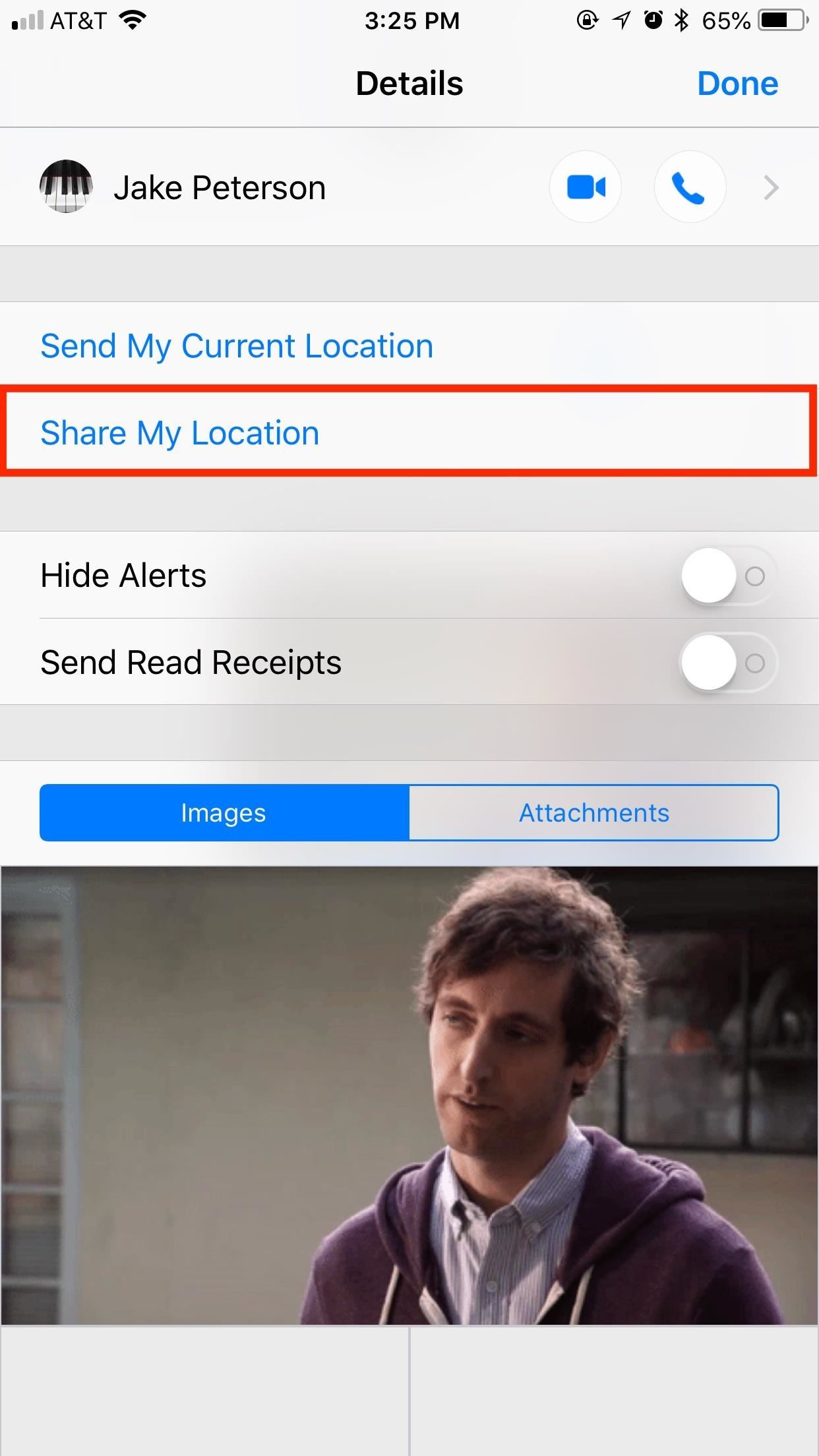
Option 2: Share Your Location for a Certain Amount of TimeIf you know you want to share your location with a friend while you're on the go, not just one place in time, "Share My Location" is the option for you. This button lets your friend track your movements for an hour, until the end of the day, or indefinitely — it's your choice how long they can track you.Setting this up is as easy as sending your location. In a chat, tap the (i) to view your contact options. This time, tap "Share My Location," then choose your duration.Don't Miss: How to Hide Alerts for Specific Conversation Threads in Messages If you choose "Share for One Hour" or "Share Until End of Day," you will see a countdown timer next to "Stop Sharing My Location" upon selecting your option. As with Option 1, you will need to grant Messages permission to use your location if you haven't done so already. Once you have chosen a duration, your friend will get an iMessage that says they "started sharing [their] location with you," followed by "Would you like to share yours?" They can either tap "Not Now" to not reciprocate or "Share" to see the same list of time options you just saw. Whether they reciprocate location sharing or not, all they have to do is tap on the map in their iMessage thread or tap the (i) button to gain access to your current location. They will be able to track you this way until the time is up or until you manually stop sharing, at which point, the connection will break. Of course, if you wish to continue sharing, you can simply repeat the process.
Manually Stopping Location Sharing in MessagesIf you chose Option 2 above and want to manually stop sharing your location, simply go back to the (i) menu, then tap "Stop Sharing My Location." After your iPhone processes the request, the connection will sever, and your friend will no longer have access. It's that simple.Don't Miss: How to Secretly Track Someone's Location Using Your iPhoneFollow Gadget Hacks on Facebook, Twitter, YouTube, and Flipboard Follow WonderHowTo on Facebook, Twitter, Pinterest, and Flipboard
Cover image and screenshots by Jake Peterson/Gadget Hacks

How to Turn Your Galaxy S3's Menu Key into a Multitasking


Just like on the Google Chrome desktop version, whenever you're not connected to the internet and you try to load a webpage on your iPhone or Android phone, you'll get the "There is no Internet connection" or "You are offline" message in Chrome with a friendly looking dinosaur image above it.
How to Play the Hidden Minigame on Chrome for Android


More often than not I default to Uber because I can do 12 rides in one day without pushing myself harder than I'm willing to. I don't avoid Lyft per se, but if I have a request coming through from both at the same time, I will take the Uber just so I can get that much closer to reaching my quest since that equals free money.


This guide will help you learn how to find out what version of webOS your TouchPad is running by checking the settings area of your tablet. If you find that your software is out of date, it will also help you upgrade your HP TouchPad to the latest version so that you always have the newest update!
You bought HP TouchPad, it's discontinued, now what? - SLD


xda-developers Nexus Player Nexus Player Q&A, Help & Troubleshooting How to show photos on Nexus Player (Android TV) by kupony XDA Developers was founded by developers, for developers. It is now a valuable resource for people who want to make the most of their mobile devices, from customizing the look and feel to adding new functionality.
How to Set Up a Photo Slideshow Screensaver in Windows 7


This lesson will demonstrate to get a voicemail account up and running on your Android-powered smartphone. First, we'll cover how to adjust your voicemail account's general settings so that it's set up the right way from the get-go. Then, we'll show you how to actually put the account into service. Setting up voicemail on an Android phone 1.
Check your voicemail - Phone app Help - Google Support


When you upgrade to a new Android smartphone like the HTC One, you can have browser bookmarks, Wi-Fi passwords, and other settings quickly transferred over from your old device using your Google Account backup. However, you'll still have to download apps individually from your Google Play list, and not all of your saved progress will be
Select a Phone, Tablet or Device Brand - AT&T Device Support


3 of 11 Add Photo Effects with Photo Editor. The Galaxy Note 8 is expected to be the first Samsung handset to ship with a dual-lens camera. So, why not complement that with an app like Photo Editor.
How to Hack a Self-Timer into - Samsung Galaxy Note 2


If you can't update or restore your iPhone, iPad, or iPod touch You can put your iOS device in recovery mode, then restore it with iTunes. In these situations, you might need to use recovery mode to restore your device:
How To Put iPhone Or iPod Touch In DFU Mode - Guiding Tech


It's also worth mentioning you can import your health records on your iPhone from multiple hospitals (as long as they're on the list of supported centers) if such is the case. You just need to repeat the steps described above. You'll be able to see all the connected hospitals in the Sources section on the "Health Records" screen.
How to export and import your iPhone Health data


How To: Change Your Galaxy Note 9's Navigation Bar Back to Black News : 5 Relatively Hidden Galaxy S9 Features You Should Know About How To : Auto-Hide the Navigation Bar on Your Galaxy S10 — No Root Needed
Switch from white backgound to black background? - Samsung

How to Get the Facebook Paper App on Your iPhone—No Matter

How To: Reply to Messages with Your Favorite Rap Lyrics Using RapKey for iPhone

How To: Reply to Messages with Your Favorite Rap Lyrics Using RapKey for iPhone
Now that Apple has added support for third-party keyboards in iOS 8, the ways we can communicate with our "peeps" has expanded beyond emojis and standard text messages to GIFs and even rap lyrics now. RapKey takes some of the best and most popular rap lyrics, then lets you choose and send them straight from their easy-to-use keyboard. Please enable JavaScript to watch this video.

Step 1: Install RapKey for iPad, iPhone, iPod TouchTo get started, make sure to download RapKey for free for free from the iOS App Store, if you haven't done so already.

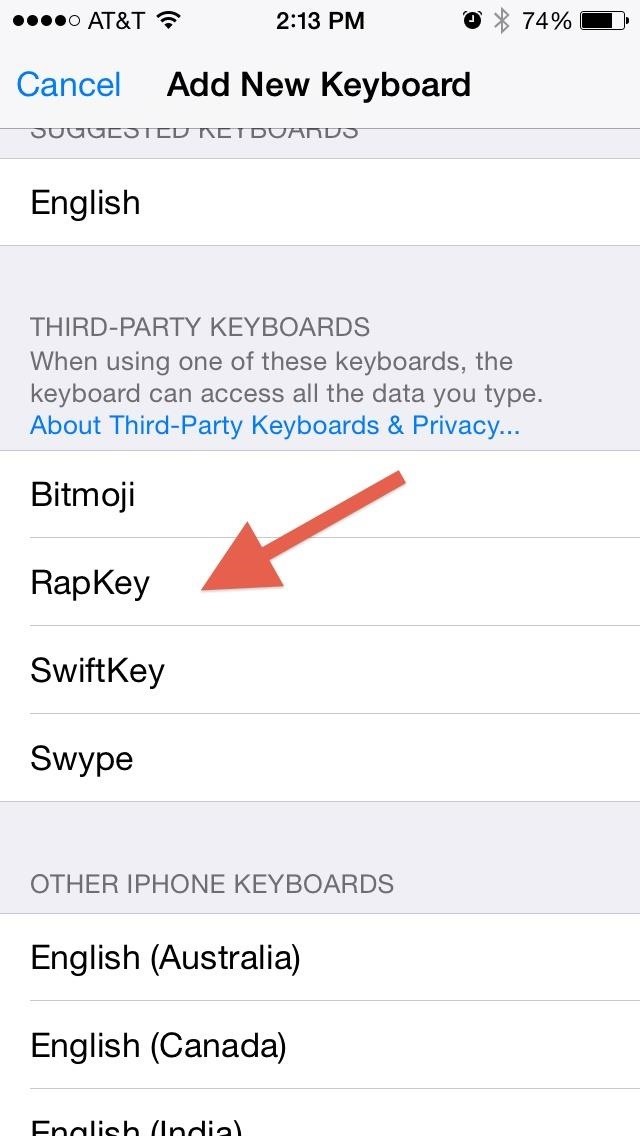
Step 2: Enable the Keyboard in SettingsBefore you can use the app, you'll need to enable it and add it as a keyboard option. Go to Settings -> General -> Keyboard -> Keyboards -> Add New Keyboard, then just tap on RapKey to add it. For more help on adding and reordering keyboards, click here.

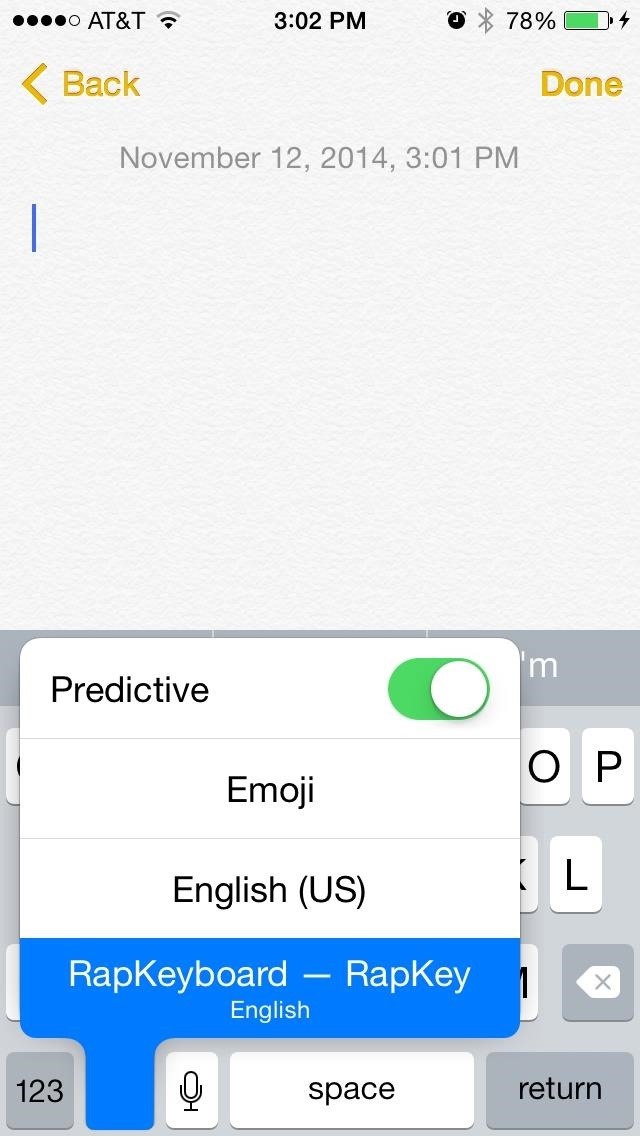
Step 3: Add Lyrics in a FlashNow head into your Messages, WhatsApp, Facebook Messenger, or even just Notes to test out the new keyboard. It should be known that some of these lyrics aren't necessarily the cleanest of clean (i.e., they're uncensored), so make sure you're sending them to the right crowd. To access RapKey, press the globe icon to bring up the keyboard options and select it. You can switch back to your normal keyboard by tapping the globe icon. For more help on switching between keyboards, click here.Scan through the different sections to find lyrics that that relate to the message you want to send; RapKey provides a glossary of what each of the sections mean. Combine these lyrics with GIFs and emojis and you have completed the text messaging trifecta. There are a few drawbacks, like only being able to delete one letter at a time or the complete absence of a space button, but the app is still functional and cool to mess around with if you dig rap music.What are some of your favorite lyrics? Let us know in the comment section below, and make sure to follow us over on Facebook and Twitter for more fun guides.


When I buy a domain (ex. website.com) and setup my XAMPP or WAMP server, what should I do to show files from my XAMPP / WAMP server when someone types my domin name to te browser? I know that I should type something to httpacess file (found it here on stackoverflow), but is it that easy?
Configure Virtual Host with XAMPP Running on Windows 10


How to Text from Gmail. This wikiHow teaches you how to send an email as a text message from Gmail. In order to do this, you'll need to know the phone number and carrier email code for your recipient.
Send SMS Text Messages from your GMail Account

WiFi Prank: Use the iOS Exploit to Keep iPhone Users Off the


Question: I downloaded several ebooks onto my computer and now I do not know how to put them onto my Nook Tablet.. There are three programs we teach you how to use. They are all free: Calibre, Adobe Digital Editions and Windows Explorer.
OverDrive | Adobe Digital Editions


This video shows how to hack google, learn and hack.. Subscribe Now..!! This video shows how to hack google, learn and hack.. Subscribe Now..!! Skip navigation Sign in. Search.
Google hacking - Wikipedia


For some reason, when you're typing in landscape mode, Android extends the text input field to cover every bit of the screen that the keyboard's not occupying. This gets pretty annoying sometimes, especially with messaging apps where you might need to reference what the other person just said in order to properly form your response.
How to Connect an Android Wear Smartwatch to Your iPhone


How To: Make a DIY hologram illusion with a monitor How To: Understand holography & holograms How To: Hack a PlayStation monitor into a digital television How To: Build an analog internet meter out of an Arduino Ethernet Shield
Make a Cool Hologram Illusion!: 4 Steps (with Pictures)


Cortana, Microsoft's personal assistant for its Windows Phones and Windows 10, will soon be released for Android. That is, officially released. It's hard to keep a good thing locked away, and to that end, Cortana for Android has been leaked, thanks to APK Mirror.


Floating windows are nothing new, though, as we've already showed you how to get floating widgets, floating application shortcuts, and even floating notifications. Included among the many new features in Android L is the new "Heads Up" notification system, showing notifications as interactive floating windows anywhere on your device.
How to Get Karaoke-Style Floating Lyrics for Any Song on Your


Disclaimer: Once you cut your card, there's no going back.Once it fits the nano-SIM form factor it won't work as a micro-SIM card anymore, meaning you won't be able to swap your card back and forth between devices that take different card sizes.
Convert a Micro-SIM Card to Fit the Nano-SIM Slot on Your HTC


You can locate your device if: Find My iPhone is set up on the iOS device or Mac you want to locate. Apple Watch is paired with an iPhone. The iOS device, Apple Watch, or Mac is online. AirPods are out of their case and near one of your iOS devices. Any of your iOS devices can find the AirPods, but they must be paired with at least one of your
Cell Phone Location Track Sold Direct - eBay | Fantastic prices on Cell Phone Location Track
AD

How to Print your family tree from your MyHeritage account

How To: Rename Multiple Files at Once in Mac OS X Yosemite

How To: Rename Multiple Files at Once in Mac OS X Yosemite
With the sheer amount of photos, videos, and miscellaneous files we place on our computers, proper organization becomes necessary. Not only so that we can quickly get to a file when it's needed, but also to declutter folders and keep them from looking like random file dumps.When you upload photos, for instance, they usually consist of a unique directory name and number—hence the reason you get some variation of "IMG_1234" in your digital photo library. Same goes for movies.Thankfully, Apple added several editing tools to Yosemite that allow you to quickly and easily rename multiple files at once. Previously, there was no way to rename a group of files unless you used a third-party app to handle the batch operation, so Mac OS X's new native tools are much welcomed. Please enable JavaScript to watch this video.

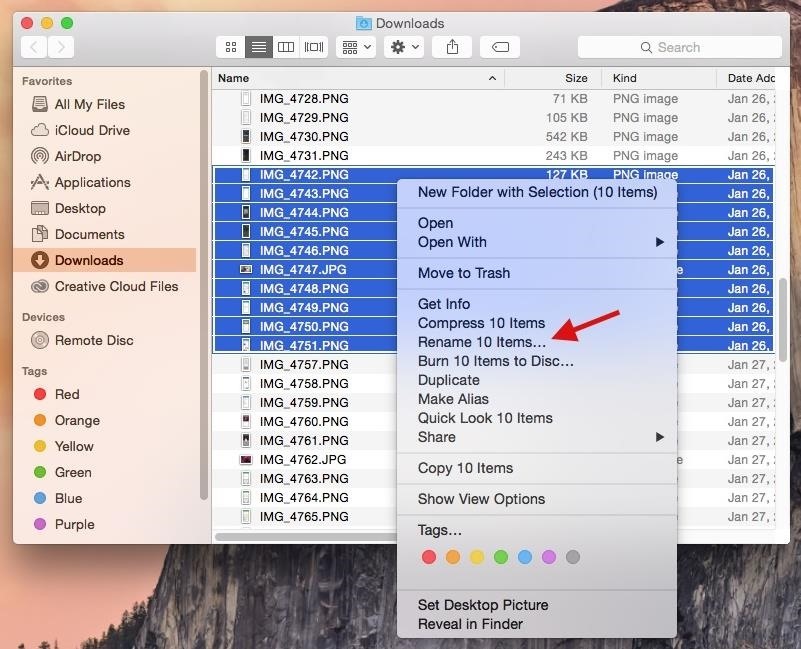
How to Rename Group Filenames CompletelyStart by highlighting a group of files in the Finder, just as I have in the screenshot below, then right-click on them and select "Rename # Items" from the menu. In the popup editor, you'll be able to either replace specific text in all of the files ("Replace Text"), add additional text to them ("Add Text"), or completely reformat the way they're all named ("Format").Since "Format" is the only option that allows me to completely rename the files, I'll be showing you that first. In the Name Format drop-down, you'll find three options for reformatting the filenames:Name and Index: name and numbered sequence (starts at 1) Name and Counter: name and numbered sequence (starts at 00001) Name and Date: name and date (year, month, day and time) I ended up choosing "Name and Index" because it makes for the shortest title and utilizes numbers. In the Custom Format field, enter the name for the list of files. For example, use the name of the place you visited, if you're renaming vacation pictures. You can also edit where you want the name in the title using the Where drop-down, as well as the value you want the number sequence to begin with in the Start numbers at field. When you're all set, just hit the "Rename" button. Above, you can see my newly renamed pictures, titled San Diego [2015], along with numbers affixed to the end of the title.

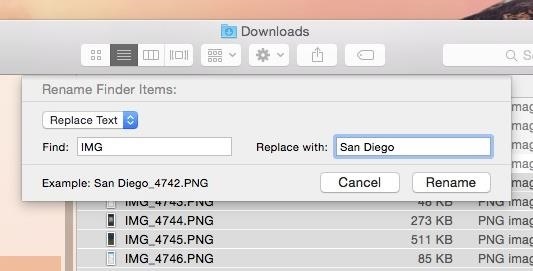
How to Replace or Add Text to Group Filenames"Replace Text" allows you to enter a keyword from the title of your files, then replace it with whatever text you'd like. For example, if your files are called something like "IMG_4742", you can enter "IMG" in the Find field and have it replaced with "San Diego" using the Replace with field. With "Add Text," you can add whatever text you want to either the end or the beginning of the existing file name. As you can see, the features for these two renaming options are somewhat limited, which is why I opted to use the "Format" option instead. But if these features do what you need them to do, then by all means, take advantage.Do you have any other tips for renaming your files or organizing your folders and desktop on your Mac? Let us know in the comments below, and keep up with us over on Facebook, Google+, and Twitter for more Mac tips.

How To: Make Interactive Heat Maps from Your Android Device's


Action center in Windows 10 is where you'll find your notifications and quick actions. Change your settings at any time to adjust how and when you see notifications and which apps and settings are your top quick actions. Select the Start button, then select Settings > System > Notifications & actions. Change notification settings for all senders
How to disable annoying Android notifications


How To: Use AirDrop to Share Photos, Contacts, & Other Files in iOS 7 News: Apple Just Released iOS 12.1.2 for iPhones with Fix for eSIM Activation Issues News: iOS 12 Public Beta 3 Released for iPhone Software Testers How To: The 10 Best New Features in iOS 12's Photos App for iPhone
This new iOS 9 exploit exposes your photos and contacts, here


Much like the Pen Window feature in Air Command, Multi Window is extremely useful in its functionality, but bogged down by serious restrictions. While you can open and use two apps at the same time, you're limited to only a handful of apps that can utilize the feature, leaving all the other ones shit outta luck.
Galaxy Note 9: How to Use Multi-Window (aka Split-Screen)

How to Play Your Favorite N64 - Samsung Galaxy Note 2


The problem is, I as many others, find the proximity light sensor does not always do a great job at turning off the screen during a call - especially when holding the phone near to your face. Ultimately, you end up pressing some of the touch screen buttons on the screen causing the call to drop.
SOLVED: iPhone Screen Goes Black During Calls - YouTube


How to Add a Link to Your Instagram Story. I used HubSpot's official Instagram account for these instructions, since my personal account isn't verified (I also, you'll be surprised to hear, don't have 10,000 followers … ). 1. Take a photo or upload one to your Instagram Story, and then click the icon at the top right that looks like a chain.
Instagram How To: Add A Link To Instagram Story - YouTube


These are instructions on how to put your iPhone, iPad, or iPod touch into DFU mode with a broken home or power button. Step One Create a new folder on your desktop called Pwnage.

How to Stream Music, Photos, & Videos on Your iPhone to Your TV


How to set up and use Handoff to transfer activities between your iPhone, iPad, and Mac Handoff lets you transfer your activities between iPhone, iPad, and Mac. For example, you can be writing an email on your iPhone as you come in the door, sit down with your Mac, and keep writing the exact same email.
How to set up and use Handoff on your iPhone and iPad | iMore


How to Set up a Personal Web Server with XAMPP. There are a number of Personal Web Server applications available on the Internet. XAMPP is one of the most robust, and compatible as far as offering a cross platform (multiple operating
Setting-up Multiple Subdomains in Your Localhost Using XAMPP


It's easy to send animated GIFs from your iPhone using the Messages app, using the built-in app drawer added in iOS 11. In this tutorial we show how to make use of this feature, and amuse and
How to Download & Save GIFs on iPhone (UPDATED FOR 2018

Finally, an App That Forces Your Kids to Answer Your Calls


Watch what you love with award-winning Amazon Originals, movies and TV shows, included in your membership. Over two million songs, ad free Get access to an exclusive library of songs from Amazon Music without any ads.
CNET - Product reviews, how-tos, deals and the latest tech news


The Newstweek might be the coolest new device of 2011 that no one is talking about. It's a pocket-sized device that allows you to access the data streaming through a wireless internet access point and change the news being read by fellow users at the hotspot, from any site, however you want.
Gadget Hacks News — Page 49 of 55 « Gadget Hacks

News: Trade in Your Grill for Japanese LED Teeth

News: Trade in Your Grill for Japanese LED Teeth

In the far away land of Japan, gold is out, glow-in-the-dark is in. LED "grills" were recently conceived of by two Japanese designers/hackers for a winter advertising event at clothing store Laforet Harajuku. The LED teeth attachments quickly became a hot item.  Please enable JavaScript to watch this video.
Foreseeably, one of the two designers demonstrating the teeth in the video above is the familiar Daito Manabe (our favorite "self-electrocuting" mad hacker). Manabe's partner, Motoi Ishibashi, came up with the idea when "he saw a video last year of LED Throwies, which are little lights that can be affixed to a magnet and thrown on metal surfaces [acting as] lighted graffiti".Directed by Manabe, "Party In Your Mouth", a group of Japanese school girls marching like zombies down the dark streets of Japan: Please enable JavaScript to watch this video.
If you happen to be in Japan, Manabe and Ishibashi are currently offering workshops on how to make your own LED smiles.
Image credit.Previously, Ouch. Demented Japanese Electrocutes Himself & Others in the Name of Art. Play Me (re: Electrocute Me) Like a Human Drum Kit.


News: Official Android Oreo Update Already Hit Some Galaxy Note 8s How To: Use the Bedtime Clock on Your iPhone to Make Sure You Always Get Enough Sleep How To: Find & Eradicate Android Apps Maliciously Tracking You on Your Samsung Galaxy Note 2
How to Rename Almost Any App on Your Samsung Galaxy Note 2


For many, phones are starting to replace televisions as the primary device for watching videos. Thanks to their portability and easy to use apps, it's often simpler to watch Netflix, Hulu, YouTube, or Prime Instant Video on the smaller screen.
Netflix vs. Hulu Plus vs. Amazon Prime: Which streaming


Play Secret Snake Game inside YouTube video - How to. there is a hidden Classic Snake game right inside every Youtube Video Block. all the Nokia(Symbian) Users out there must be knowing how interesting and fun it is to play that Snake Game.


Can you fully remove Google system apps from Android including the Play Store updates? on my Android and want to be completely optional for my Android experience
Google Stores Your Voice Search History—Here's How to Delete


One other way to explain it. With a Pixel 3, you are almost guaranteed an attractive photo with the single press of a button. With the Nokia 9 PureView, you may have to spend 30 seconds or a minute processing to get the results you want. I hope this helps! PS I would put the Nokia 9 above the Samsung Note 8 and Samsung S9 etc.
Nokia 9 PureView review: Five cameras doesn't equal 5x better


How To: Change the Home Screen Icon Shapes on Your Pixel in Android 10 How To: Effortlessly Hack & Mod Your Samsung Galaxy Note 2 Using the Android Everything Tool Android Basics: How to Find Your Phone's Screen Density Value (320 DPI, 480 DPI, 640 DPI, Etc.)
How to Change DPI Scaling on the LG V30 « Android :: Gadget Hacks


Changing your Auto-Lock time is one of the many ways to customize the Lock screen as well. If you want to stop your iPhone from locking, here's how to keep your iPhone screen on. But first, we'll cover how to fix the iOS 11 bug wherein an iPhone keeps going to lock screen in the middle of using an app.
How to Unlock the Hidden Weather Lock Screen Widget in iOS 12


Among them, is the ability to use Google Maps hands-free, which is definitely a boon while driving. After all, the less distracted you are, the safer your journey will be. Here's how you need to setup Google Maps for hands-free navigation and the most useful voice commands for this purpose.
How to Enable Turn by Turn Google Maps Voice Navigation in
innov8tiv.com/how-to-enable-turn-by-turn-google-maps-voice-navigation-in-iphone-and-android/
In order to turn off the voice navigation, just tap the cross button and it will be turned off. Choose the route you want to take if shown different routes and press "Start". Google Maps voice navigation will be turned on. This was how to turn on voice navigation for Google Maps in Android. Google Maps Voice Navigation iPhone
Google Maps How to use Turn By Turn Voice Navigation (IPhon


But if you are using free blogging publishing service, try to speed up your blog by analyzing speed of your widgets / plugins first. My blog is on Blogger, and I managed to reduce the load time from 2s to less than 1.5s just by removing Blogger NavBar and one widget.
Improving PHP Performance for Web Applications - KeyCDN


Android apps continue to run in the background, even after you've moved on to other tasks. Here's how to close those apps to free up memory.
Fastest Way To Close All Programs and Windows In Windows 10

How To: Improve your download speed

How To: Improve your download speed
The key to understanding download speeds and if it's possible to improve yours, is really to understand that you want to increase your bandwith. Check out this video and see how to learn about bandwith, kilobytes and kilobits per second and improve your own download speeds. Please enable JavaScript to watch this video.


Find out how to increase Wi-Fi speed and improve overall quality of your wireless experience for streaming videos, music, or chatting with friends.
How to Double Your Internet Speed With One Settings Change


To increase your productivity you need to increase Internet speed in Windows 10. After installing Windows 10, are you feeling that your Inter bandwidth is dropping away? If yes, that means your operating system is stealing your Internet speed. You can follow these optimization methods to improve internet connection.
How to Increase Wi-Fi Speed and Overall Wireless Quality


Report Ad
Run Your Fastest 40 Ever. Speed techniques & info here


If your computer isn't using an Ethernet connection, connect it to your router with an Ethernet cable and see if your downloads increase in speed. If your downloads do increase in speed, your wireless connection to the router is poor. Try staying closer to the router or purchasing a stronger router. If the download speed doesn't increase, the
Download Speed: 13 Ways to Increase Your Internet Speed Today


While there are several tweaks and steps you can take to test and improve your internet connection speeds, one of the easiest and quickest ways to speed up your web browsing is modifying the Domain Name System (DNS) servers.
5 Easy Ways to Improve Your Sprint Speed | STACK


Gaming How to boost your Steam download speed. Tired of waiting for your game update or new game download? Here's a tip to speed up your connection to Steam and spend your time playing, not waiting.
How to Speed up your Internet! Boost Download Speeds, Lower


How to increase download speed on windows 7?oh god it's too slow. Hi. The download speed has as much to do with the website server where you are downloading a file from as it does with your internet connection speed.
How to Increase Internet Speed in Windows 10 by 80%


Download faster: How to speed up your internet. Now let's dive into a few ways that you can improve your internet speed. Remember, some Internet companies advertise huge speeds as a theoretical "potential" but in reality you will never get near it.
How to boost your Steam download speed - CNET

How to Boost Your Download Speed (with Pictures) - wikiHow


Speed is valuable at any level of competitive athletics, so if you want to improve your speed and make yourself more marketable to coaches and scouts, try these drills and exercises. 1. Start with
Speed Training Techniques
AD


How to Speed Up Downloads when Using Internet Download Manager (IDM). This wikiHow teaches you how to increase the download speed of items downloaded through Internet Download Manager (IDM), which is a download accelerator for Windows
How to increase download speed? - Microsoft Community


This video will teach you guys how to increase your download speed, lower lag, lower ping and reduce buffering on your internet by using a few of my best methods, this is intended for ALL users
How to Speed Up Downloads when Using Internet Download