Updated: How to Fix the Rapidly Draining Battery Issue on Your Nexus 5

Updated: How to Fix the Rapidly Draining Battery Issue on Your Nexus 5

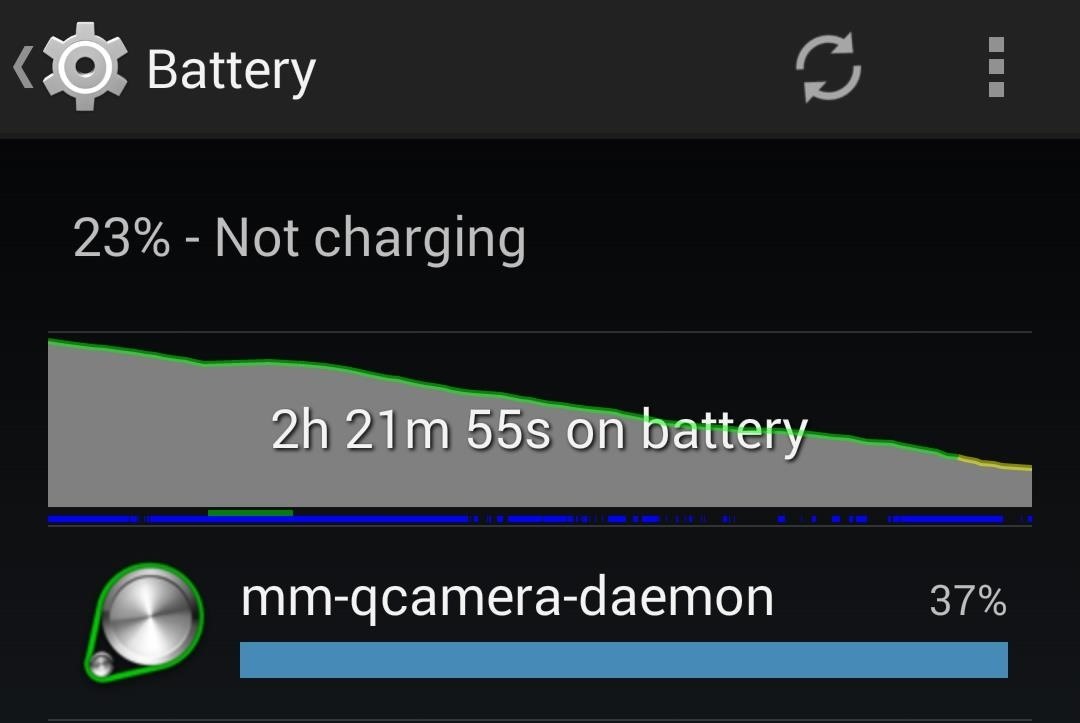
Update (March 18, 2014):Skype has issued an update to their Android app, and among other things, has "fixed" the runaway camera process issue by creating a workaround...and that's about all we know. No details were provided, but with the considerable uproar over the bug, let's hope it's been squashed for good.The other big change also affects battery life, with the introduction of "aggressive battery savings", a feature that in theory should allow you to leave Skype running in the background all day without taking significant hits to battery life.Head to Google Play to update your app, and let us know if you notice your battery life getting a little better.End UpdateEver since the Nexus 5 was released back in October of 2013, many of us were left scratching our heads as to the why our batteries were draining so much faster. And boy, did we let Google know!With so many people reporting the same type of issue, Google took notice, and today, stated that a fix was on its way. Ready to be delivered through the next maintenance update, the fix concerns high CPU usage causing battery drain through the persistent use of mm-qcamera-daemon, a camera process built into the Qualcomm CPU. This process is called up whenever the camera is activated. In most instances, the process will stop when you leave the camera/gallery, but that's not always the case. Skype utilizes the camera, obviously, but with Nexus 5s, the process was left ongoing, meaning that the camera never stopped and your battery continued draining.As reported by Eino-Ville Talvala, Google "can't provide an estimate for when the maintenance update will be ready, due to all the testing we need to do for this and other fixes."Until then, you can try two common fixes for the issue:
Fix #1: Reboot Your DeviceIn most instances, a reboot will kill the process, and you should see normal drain of the battery. Unfortunately, this means having to reboot whenever the camera is used, and that's a pain.
Fix #2: Uninstall SkypeThis is probably less appealing, as lots of us use Skype. It's important to note that this is not an issue with the app, but rather how the Nexus 5 deals with the process. But until the update this issued, Skype users may want to search for alternatives, or install/uninstall the app on an as-needed basis.If neither of these options appeal to you, you're not alone. But rest assured that a solution has been found, it just needs to find its way to our devices.
Screenshot via cguella


Report Ad
Shop Samsung Watches at Macy's. Buy Online, Pick Up In-Store Today!


Use Continuity to connect your Mac, iPhone, iPad, iPod touch, and Apple Watch Move seamlessly between your devices with Handoff, Universal Clipboard, iPhone Cellular Calls, SMS/MMS messaging, Instant Hotspot, Continuity Camera, AirDrop, Apple Pay, and Auto Unlock.
Continuity for iPhone, iPad, and Mac: The ultimate guide | iMore


Best Black Friday 2018 deals: Computers New Atlas Team November 20, 2018 . Need to update your computer? Now is the best time to do it with some sensational Black Friday deals on laptops
Best Black Friday 2017 deals for phones - CNET


This is part of the VisiHow series on how to use the Samsung Galaxy S4. You can visit the main VisiHow on how to USE SAMSUNG GALAXY S4 for a full list of S4 VisiHow Articles. Do you have some applications on your Galaxy S4 that are useful and entertaining, yet annoy you by bombarding you with notifications?
Notification Sounds And Alarm Vibrate Settings On Galaxy S9


How To: Play Your Favorite N64 (Nintendo 64) Video Games on Your Samsung Galaxy S3 How To: Play Nintendo DS Games on Your Samsung Galaxy Note 2 How To: Play Super Mario 64 and Other Popular Nintendo 64 (N64) Games on Your Nexus 7 Tablet
How to Play Super Nintendo Games (SNES) on Your Samsung Galaxy S3


Other Features of the Samsung Galaxy Note 8 Video Downloader - KeepVid Pro. Now that we have shown you how to download videos on Samsung Galaxy Note 8 take a look at the list below and see some of the other features that the Samsung Note 8 Video Downloader - KeepVid Pro includes. Download Multiple Videos at Once.
How to Download and Watch YouTube Video on Samsung Galaxy Tab?


Depending on what you need to sync, you might also want to install iTunes for Windows.If you've got any kind of local media on your Windows machine that needs syncing to your iPhone, this is the
Use Kindle Family Library to Share Purchased eBooks With

De-Bloating Your Samsung Galaxy Note 2: How to Delete


According to this survey, Samsung is the market leader with global Android device market share of 37.8%. Each device has its own hardware specifications, so it becomes very tricky to select best device to test on, out of these. Device Configuration : Android devices are available in number of different configurations.
Is Your Device Qi Wireless Charging Compatible? Check the


This video shows you how to easily put ring tones on your Motorola Droid phone. The first thing you have to do is plug in the Droid to your PC and open the Removable Disk that pops up. Next, you have to create a new folder and name it "Music". Then, you can simply copy-paste or drag-and-copy mp3
How to load custom ringtones onto your droid withour


How to Connect an iPad to Bluetooth Devices. This wikiHow teaches you how to connect your iPad to a Bluetooth item, such as a car stereo or a speaker. The process of connecting two things by Bluetooth is called "pairing."
Pair a third-party Bluetooth accessory with your iPhone, iPad


The Xperia XZ Premium earned a "good" rating in PCMag's review. We liked its "crisp 4K HDR display," and "powerful Snapdragon 835 processor," but docked points for its "poor battery life" and
Sony Xperia XZ Premium Release Date, Specs News: Smartphone


Queensland's peak motoring body has revealed the secrets on how to save time and fuel by triggering a green traffic light. Ally and trigger a green light can save motorists time and fuel
What to do about traffic signals that ignore motorcycles

How To: Make a cell phone holder

How To: Make a cell phone holder

In this series of handy crafts videos, our expert jewelry maker will show you how to create a custom home for your cell phone. She tells you how to choose materials for this utilitarian wire sculpture, then demonstrates how to wind the wire into just the shape you want for a resting place for your cell phone, or any number of other items that need storing, including eyeglasses and whatever else your imagination can dream up. Part 1 of 19 - How to Make a cell phone holder

Make a cell phone holder - Part 2 of 19
Click through to watch this video on expertvillage.com

Make a cell phone holder - Part 3 of 19
Click through to watch this video on expertvillage.com

Make a cell phone holder - Part 4 of 19
Click through to watch this video on expertvillage.com

Make a cell phone holder - Part 5 of 19
Click through to watch this video on expertvillage.com

Make a cell phone holder - Part 6 of 19
Click through to watch this video on expertvillage.com

Make a cell phone holder - Part 7 of 19
Click through to watch this video on expertvillage.com

Make a cell phone holder - Part 8 of 19
Click through to watch this video on expertvillage.com

Make a cell phone holder - Part 9 of 19
Click through to watch this video on expertvillage.com

Make a cell phone holder - Part 10 of 19
Click through to watch this video on expertvillage.com

Make a cell phone holder - Part 11 of 19
Click through to watch this video on expertvillage.com

Make a cell phone holder - Part 12 of 19
Click through to watch this video on expertvillage.com

Make a cell phone holder - Part 13 of 19
Click through to watch this video on expertvillage.com

Make a cell phone holder - Part 14 of 19
Click through to watch this video on expertvillage.com

Make a cell phone holder - Part 15 of 19
Click through to watch this video on expertvillage.com

Make a cell phone holder - Part 16 of 19
Click through to watch this video on expertvillage.com

Make a cell phone holder - Part 17 of 19
Click through to watch this video on expertvillage.com

Make a cell phone holder - Part 18 of 19
Click through to watch this video on expertvillage.com

Make a cell phone holder - Part 19 of 19
Click through to watch this video on expertvillage.com

Install Windows 8.1 or Android KitKat as primary OS (Windows
Two Ways To Change Your Android Boot Animation [Android Tip


These 10 widgets belong on your iPhone's lock screen. I want more from my weather widget and turned to BeWeather because its widget lets Have you come to embrace iOS 10's lock-screen
iOS 12 Draining Your iPhone Battery Life? Here Are 10 Ways to


I cannot access facebook because of net nanny - what settings do I need to change - I need detailed but basic - Answered by a verified Tech Support Specialist We use cookies to give you the best possible experience on our website.
How to Control which games can be played with Net Nanny


Despite of above all factors, you can still find the way to block and unblock Facebook apps or game as easy as before. Removing these app invitations, alerts from your account can be tedious and annoying, but there is an easy way to selectively block them altogether.
How to unblock someone on Facebook - Android Authority


Once you get back up, you'll be running the latest version of Android, encryption will still be disabled, and your phone will still be rooted with its custom recovery in place. In the future, now that you have ADB and Fastboot installed on your computer and the necessary drivers are configured, updating again will be even easier.
How to Update Your Rooted Phone « Android :: Gadget Hacks


If you're one of the eager masses, use this how-to to enable tethering on any iPhone running iPhone OS 3.0--without jailbreaking--on a Mac. (Other blogs have reported Windows tethering steps
How To "Tether" Your iPhone For Free Without Jailbreaking

5 easy tricks to help you free up storage space on your iPhone


News: iOS 11.3 Bug Removes Screenshot Previews for Some iPhone Users How To: The 9 Most Annoying Changes in iOS 11 & How to Fix Them How To: Disable Notification Previews for All Apps in iOS 11 How To: 18 Tips for iOS 11's New Screenshot Tool on Your iPhone
18 Tips for iOS 11's New Screenshot Tool on Your iPhone


Samsung has long enabled users to move apps to external storage. We published a detailed guide on how to move apps to the SD card on the Galaxy S7 and Galaxy S7 edge.That guide was required because the procedure was changed slightly for devices on Marshmallow.
Samsung Galaxy Note 4 - Move Files from Internal Storage to


How to Restore the Mobile Data and Mobile Hotspot Quick Settings Toggles on Samsung Galaxy Devices. Love them or hate them, Samsung is by far the most dominant manufacturer of Android smartphones
How to use Galaxy S10 Settings? - Galaxy S10 Guides


In this tutorial, I'll be showing you how to enable grayscale mode on your iPhone or iPad running iOS 8. This feature may just be proof of the AMOLED display the iPhone 6 may have, which would
Find Out Whether Your Phone Has an LCD or AMOLED Display


News: Use Android's Airdrop-Like Nearby Service to Share Things More Easily How To : The Easiest Way to Back Up, Restore, & Sync Files Between Your Computer & HTC One How To : Enable Dark Mode in Google's Contacts App for Android
Hacking into Private Friend List in Facebook (Mark Zuckerburg
How To: Fix Firefox's YouTube Background Playback Feature on Android

How To: Fix Firefox's YouTube Background Playback Feature on Android

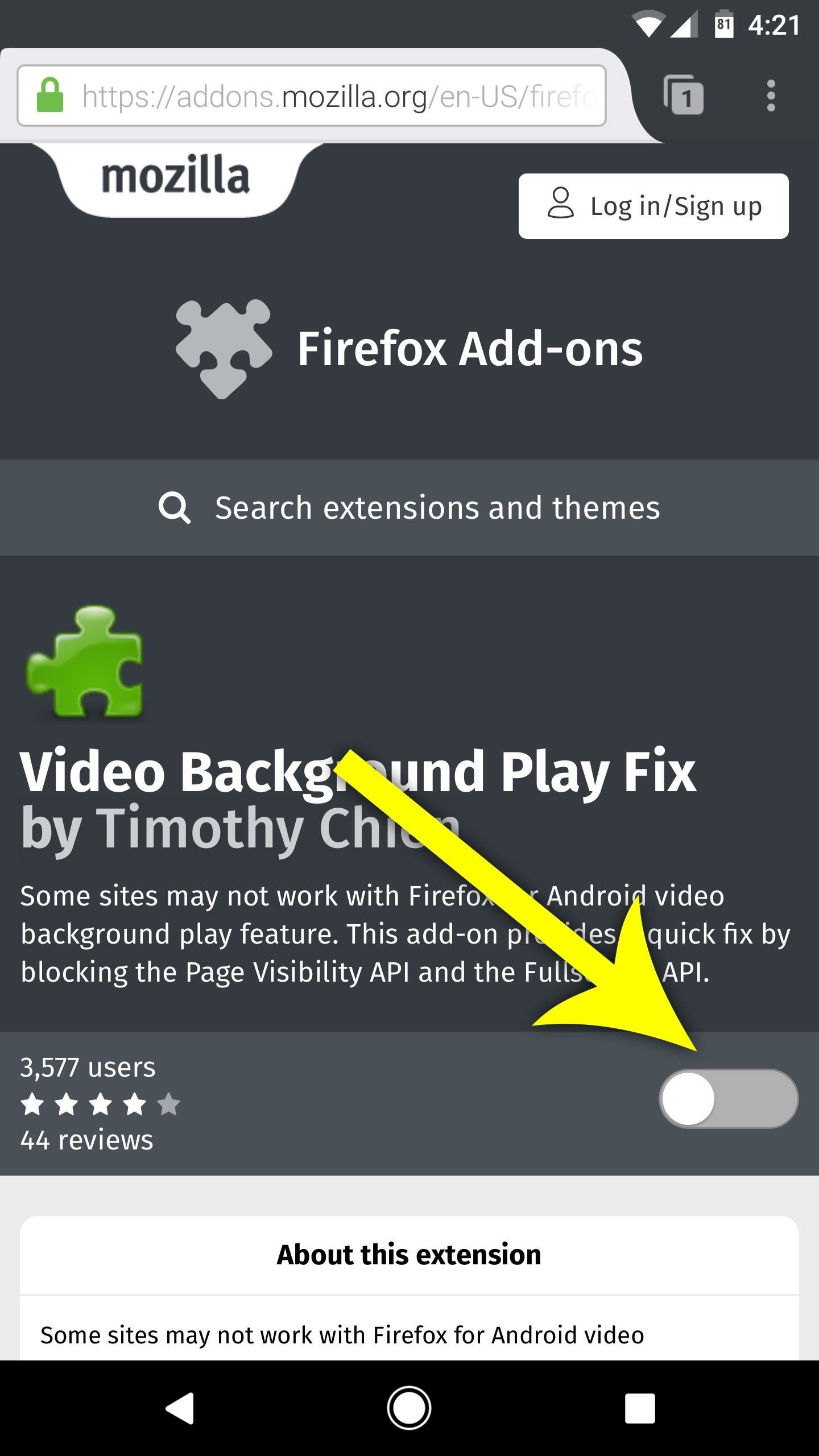
Until recently, Firefox had the ability to continue playing YouTube videos in the background after minimizing the browser. It worked great as a YouTube Red alternative, but unfortunately, Mozilla removed this feature after some pushback from Google. Thankfully, there's a way to get it back.It's really just a matter of installing a Firefox add-on, so it couldn't be any easier to get YouTube background playback working again. Let's get straight to it, then.First, make sure you're running the latest version of Firefox for Android, then just head to the following link. From there, tap the toggle switch to enable the add-on, which is provided by developer Timothy Chien.Install the YouTube background playback fix for Firefox From now on, you can lock your screen, press your home button, or switch to any other app after you've started playing a YouTube video in Firefox, and the audio will keep on playing in the background. You even get a notification that lets you pause playback or switch tracks in a playlist, so it's perfect for playing music. Is this your favorite non-root solution for getting YouTube background playback without paying for YouTube Red, or do you have another app you'd like to suggest? If so, tell us all about it in the comment section below.Don't Miss: The Top 4 Phones for Music Lovers & AudiophilesFollow Gadget Hacks on Facebook, Twitter, Google+, and YouTube Follow Android Hacks on Facebook, Twitter, and Pinterest Follow WonderHowTo on Facebook, Twitter, Pinterest, and Google+
Cover image and screenshots by Dallas Thomas/Gadget Hacks


The first developer beta for iOS 13 is available to install on iPhone models, but the process for doing so may be a bumpy ride. Apple has not included configuration profiles for the developer beta yet, and many developers are having issues installing iOS 13 even with macOS 10.15 Catalina installed.
iOS 13 Developer Beta 1 Available for iPhone with a Lot of


How to cut the tracks of a stripboard. it at slightly different angles to the circuit board. If the edge gets dull, just a few strokes on the whetstone will fix


How To: Connect Your PS3 Controller to Your Samsung Galaxy S3 for Better Mobile Gaming How To: Get the Hunger Games Movies for Free on Sasmsung Galaxy Devices How To: Get Better Quick Settings on a Samsung Galaxy S3 with This Fully Customizable Control Center
How to Enable "Unknown Sources" in Android to Install Apps


[question] how do I remove a tweak if cydia crashes when I try to click remove Question (self.jailbreak) submitted 3 years ago by idonthaveanametoday iPhone 6 Plus, iOS 8.4 I've tried this in safemode and I'm not near a wifi network.
How to Delete Cydia and Electra Jailbreak on iOS 11 - 11.4.1


How to Move Applications from Internal Memory to an SD Card on an Android Phone. Are your apps taking up too much room on your phone's internal storage? If you are running an older version of Android, you may be able to move your apps to
Free up Internal memory by Installing / Moving Apps to your


"Getting the HTC U11 life you're having it at an affordable price. The Usonic headphones are really, really great, so getting that in box is a bonus and is definitely a great value."
PhoneDog | The Leader in Mobile Phone News and Reviews


With Android Oreo, Google implemented a new set of features called "Vitals" that, among other things, aim to intelligently limat background activity in order to save precious battery life. And so far, it works exceptionally well. There's just one problem: not everyone has Oreo, Nougat, or in some cases even Marshmallow.
Automatically Kill Battery-Draining Background Services on


Adware can show unwanted ads on your computer screen so that your cannot stop them, redirect your web browser to shady web-pages, and it can cause undesired websites to pop up on your browser. Adware might end up on your PC system after you download and install free programs from a questionable web page. Does adware steal your personal information?
22 Google Chrome Extensions to Make Google+ Even Better


How To SSH Into Your iPod Touch 1G, 2G, iPhone 3G, 3GS Via USB teasermaniac. How To Jailbreak 3.1.3 Firmware on iPod Touch 1g, 2g & iPhone 1g, 3G - RedSn0w - Duration: 7:51.
How to SSH into iPhone, iPod Touch & iPad Through WinSCP?
jaxov.com/2010/06/how-to-ssh-iphone-ipod-touch-with-winscp/
The following step-by-step guide will explain you how to SSH your iPhone, iPod Touch and iPad using WinSCP. For those who don't know, SSH stands for "Secure Shell" and its a network protocol which allows you to transfer files and execute shell commands over a secure channel.
How To SSH Into iPhone/iPod Touch - YouTube


Bloatware noņemšana (saknes) Ja vēlaties pilnveidot savu viedtālruni un izdzēst visus šos izdzēšamos bloatwares, tad vienīgā iespēja ir sakļaut ierīci. Jūs varat atrast viegli ThunderBolt sakņu norādījumus par ātrāko root-to-date, Easyroot + S-Off, pār xda izstrādātājiem. Tā ir tikai Windows programma (žēl Mac).
Stock and Root - HTC Thunderbolt | Android Forums


The camera hardware itself is crucial, but what's hardware without good software to highlight its real potential? It doesn't matter which version of the smartphone you have, they're all powered by the very same OnePlus camera app. Starting with the OnePlus […]
How to Upgrade Your OnePlus 3 or 3T with a Better Camera for


Apple has made important changes in iOS 12 to elevate your security. Now when you turn on or restart your iPhone or iPad, iOS 12 temporarily disables the screenshot-taking and Camera shortcuts on the Lock screen until you have authenticated with your passcode, Face ID or Touch ID.
How to Disable Lock Screen Widgets in iOS 11 on iPhone


News: The Pixel 3 Still Has a Circular Polarizer By Dallas Thomas; Android; Google Pixel Tips, Tricks & News; The Pixel 2 XL had what Google called a circular polarizer to ensure the screen would be visible from any orientation while wearing polarized sunglasses.
Pixel XL vs Pixel 2 XL Polarization Comparison : GooglePixel


Frost Lite - Private Browser is a third example I want to mention here: rated 4.4 stars at about 1,500 votes it seems to be more feature-rich than aforementioned browsers (e.g. offers tabbed browsing). For more details, just follow the links. For more examples, use the first link to my Playstore search results.
3 of the Best Navigation Gesture Apps for Android - Make Tech


Method 1: Use hardware buttons (volume down + power button) to take screenshots on Galaxy S10. On all Android phones, you can take a screenshot by pressing the holding Power button and Volume down button simultaneously. This works on Galaxy S10 as well.
How To Take Screenshots Without Power Button on Android

How To: Install a custom ROM on a rooted HTC HD2 Google Android smartphone

How To: Install a custom ROM on a rooted HTC HD2 Google Android smartphone
Unlock your HTC HD2's hidden potential by running a custom ROM on it! Loading custom ROMs lets you do fun things with your HTC G1 like overclocking it, and even turning it into a wireless hotspot with WiFi tethering. For all of the details, and to learn how to put a custom ROM on your own HTC HD2, take a look. Learn how to hack your HTC HD2 Google Android smartphone with this video guide. Please enable JavaScript to watch this video.


Transmission, one of the most used BitTorrent clients, is now available for Windows. The community driven application has had a dominant presence on OS X and Linux distributions for more than a
The 10 Best Torrent Clients For Windows 10 - May 2019


Keeping malicious apps off your child's phone, or in some cases, keeping them from using certain apps, can feel like an intimidating task. But with Android, you can use a mix of the phone's features and parental control apps to control screen time and keep kids away from certain apps.
Use a Firewall to Keep Data-Hungry Apps in Check - Android


Image of Dallas Thomas / Gadget Hacks Step 3: Install the Magisk Manager App . Next you need the Magisk Manager app on your phone to install. In addition to serving as a root administration app to grant or deny superuser permissions to other apps, this app also provides an interface for installing Magisk modules and helps you get your root status on the Google Security Network to hide.
How to Root OnePlus using Magisk - YouTube

How to Install and use Opera Mini on an Android phone


From now on, every time you long-press or swipe up from your home button, your custom app will launch instead. There are several apps that you can use to replace this gesture—you can set it to turn your screen off, use it to launch any app, or even disable the gesture altogether.
How To Enable Lock Screen Gestures on Android (Launch Apps


Enable Kids Mode On A Samsung Galaxy Tab 3 7.0 Kids Mode is a pretty cool feature that Samsung loaded onto the Samsung Galaxy S5. It's a great way to make sure, if you have kids, that they can use your device safely without accidently affecting any of your settings or data.
How to make your Android device safer for your kids


Not every country gets the same TV shows and movies on Netflix, and there are definitely differences between the American version of Netflix and other regions, such as Canada (where I live). So, it's not surprise that people are looking to "unlock" that content. With the popularity of my "How to
How to watch US Netflix and other regions - WatchTVAbroad.com


Just like RedSn0w, PwnageTool is an application developed by the iPhone Dev Team that allows you to jailbreak your iPhone, iPad, and iPod Touch.Unlike RedSn0w, PwnageTool creates custom iOS firmware images to user-defined specifications.
How to Jailbreak iPhone 4.2.1 with PwnageTool


Mobile Leer en español How to use Google search to find your lost Android phone. Run a search for your Android phone via Google it'll pinpoint the phone's location on a map.
Get started with Google Photos - Android - Google Photos Help


Google started the roll out of new privacy controls for its customers on May 1, 2019 that allow Google customers to configure auto-delete parameters for Activity data that Google collects. Customers may enable auto-delete to have data deleted automatically when it reaches a certain age.
Android Auto gets major update, now works in every car - Roadshow


Sign in to iCloud to access your photos, videos, documents, notes, contacts, and more. Use your Apple ID or create a new account to start using Apple services.
How to Add Additional Emails to FaceTime & Messages in iOS 11

News: How to Get Skype's New Android App with Native Calling, SMS & Contacts Management

News: How to Get Skype's New Android App with Native Calling, SMS & Contacts Management
There's no question about it—Skype is one useful program, but has always been lacking in the mobile department. On your desktop, Skype works just fine and all of its options are available for usage. However, the same cannot be said for Android. On Android, you can't even change your status to "Away" or "Invisible."Until recently, you weren't even able to disallow direct connections or automatically play streamed content. Other common complaints included slow performance, notification issues (primarily, not getting any), and low-quality calls (both audio and video). Perhaps Microsoft finally took a look at the reviews being left on their app for Android and decided to do something about it, because they've just published a new Skype app that's looking to solve all of this.Don't Miss: Spammy Skype Requests on Android? Here's How to Block Them Automatically

Enter Skype MingoSkype Mingo was released on December 12, 2016 as an alpha testing app for Android users. It was a free app on the Google Play Store and included a multitude of features. Why the past tense? Because it's no longer available on the US version of the Google Play Store (it says "This items isn't available in your country"). We suspect this is because Microsoft reached its quota for alpha testers.However, if you have "Unknown sources" enabled, you can still sideload Skype Mingo to try it out right now. Just grab the APK from APK Mirror to get started. If you've used Skype before, some of the basic features like instant messaging and audio/video calling should be familiar to you. However, it's the new stuff that makes Skype Mingo so special.The newer features include native calling, texting, and contact messaging. This means you can use your own number through Skype to text and call, and you can also edit your contacts. Think of it as a four-in-one app: your phone app, texting app, contacts, and Skype! The best part is that this "alpha" version is designed to be extremely lightweight and fast, which does make it sound as though Microsoft is taking user input into consideration.Not all of Skype's existing settings are included, but we do have to keep in mind that is the first release of an alpha app. One of my favorite new settings and features is the "eco calling" option and associated data monitor. It tracks your internet usage and attempts to save you as much data as possible, while making it easy to see how much data you've already used.
Not for AllThis alpha variant of Skype might not be for everyone, as it most likely has a few more bugs than what Skype had listed in the Play Store description before it was pulled. It also comes with more features than ever, which might be too much for a traditional Skype user. It's okay if this version isn't for you (we won't hold it against you... maybe).If you're looking for just the Skype that you know, in a better state than the current Android app is, we do have an alternative for you. Microsoft also released a beta Skype version earlier this year called Skype Insiders, which is also free on the Play Store (and still there). It's just Skype, but with a ton of updates that Microsoft is working on to improve Skype on Android. Check out both apps and let us know which one you like more.Follow Gadget Hacks on Facebook, Twitter, Google+, and YouTube Follow Android Hacks on Facebook, Twitter, and Pinterest Follow WonderHowTo on Facebook, Twitter, Pinterest, and Google+
Cover image by 27707/Pixabay; Screenshots by Kevin M./Gadget Hacks


How To: It's Raining Sweets and Treats! How to Make Your Own Pneumatic Candy Cannon How To: Make an AC Arc Welder Using Parts from an Old Microwave, Part 2 How To: Instant Ice! How to Waterbend in Real Life The Mega Solar Scorcher: Harness the Power of the Sun with Your Old TV
How to Make a Powerful PVC Air Cannon with Coaxial Piston


When you use hashtags in your posts, you let Instagram know to put your post in the appropriate folder in case anyone searches for it. With approximately 70% of Instagram content going unseen and out of user's feeds, hashtags help increase discoverability.


SoundCloud is one of the most popular music streaming services for good reason. You can upload your own music, listen to remixes from your favorite DJ, check out the latest releases from mainstream artists, and even discover new artists. But while you've always been able to listen to most songs for
How to Download Music from Soundcloud App to Android Phone


News: 'Metaphor' Exploit Threatens Millions of Android Devices—Here's How to Stay Safe News: Here's Everything We Know About What's Coming in the iPhone 7 News: The Oculus Rift Is Finally Out—Here Are Its Biggest Downsides
Metaphor « Wonder How To


Your friends will not know whether you have them as a "close friend" or "Acquaintance" so you can move them from one to another. You will see fewer posts from the friends you have as "Acquaintances", where with "Close Friends" Facebook will also move their posts to the top of your feed.
How do I remove Acquaintances from friends list - Facebook


In Gmail, you technically can't unsend an email. However, you can set a delay between when you press "Send" and when your message actually gets sent to a recipient's inbox. You must first turn on Undo Send. To do this: Open Gmail. Click Settings on the top right. Under "Undo Send," check the box labeled Enable Undo Send. In the
Gmail: How to Unsend an Email in Gmail - edu.gcfglobal.org


How To: Disable Forced Encryption on the Nexus 6 for Faster Performance How To: Install a Custom Recovery on Your Nexus Without Using a Computer How to Root Android: Our Always-Updated Rooting Guide for Major Phone Models How To: Root a Nexus 4 or Nexus 5 in Under a Minute
[GUIDE] Unlock/Root/Flash for Nexus 6P | Huawei Nexus 6P


There is a registry tweak that can bring back the uninstall confirmation prompt to ensure you have less "OH GOD, THAT WAS A HUGE MISTAKE" moments when managing your programs. Best of all, this tweak works in Windows Vista all the way up to Windows 10 .
How to Uninstall Programs That Won't Uninstall from Windows 7


How To: Make a hovercraft for less than 5 bucks News: This Real-Life Star Wars Hover Bike Could Be the Future of Personal Transportation The Future Is Near: Flying 45 MPH Hover Bikes Just a Few Years Away
44 Best Hover bikes images | Hover bike, Flying car


Hacking someone's Facebook account gives you access to all their con-tacts, and all their secrets. However, you need to find the right app for it. This article will give you a detailed overview of the 10 best Facebook hacker apps to hack Facebook online.
How to hack someones facebook messenger 2019?


2014-10-23 Theft of power through hacking of Smart Meters. to demo their smart meter hacking tools at the Shmoocon to Hack your electricity meter « Hacks
Hack Your Meter While You Can | Greentech Media


VideoJug shows you how to take part in a web chat without causing offence to anyone. This is a guide to internet chat room behaviour covering creating a persona to safety.
How to Behave on IRC: 9 Steps (with Pictures) - wikiHow


2. iOS 13 public beta: This is Apple's way of testing features on a larger scale, and that will roll out in July - last year the iOS public beta release date was June 25, so it's a bit later in
iOS 13 Public Beta Will Be Released as an OTA Update


Speed dial is a handy function to have set up on any telephone, especially if you have a group of people who you call often. Speed dial can be set up on both your home telephone and your mobile phone. By setting up speed dial, you can easily call your contacts by pressing just one button instead of dialing an entire phone number.
How to add a speed dial for a contact in BlackBerry 10

How To: Hate Apple's New Maps App in iOS 6? Try Out One of These Free Alternatives on Your iPhone

How To: Hate Apple's New Maps App in iOS 6? Try Out One of These Free Alternatives on Your iPhone
To say that I am disappointed with the new Maps application in iOS 6 is an understatement. And it seems like the rest of the world is with me, so I needed to find a solution—and quick. Installing the Google Maps web application is a nice quick-fix, but those looking for a beefier navigation solution should check out one of these free map apps.

Scout by TelenavScout is probably the most legit free map app in the Apple App Store right now. Telenav hopes to take advantage of the disappointment in Apple's new Maps by offering an entire year of free turn-by-turn direction, as well as voice-activated searches. For those still rocking the iPhone 4 or 3GS, Siri enhanced turn-by-turn navigation isn't available through the new Maps app, so this is a huge plus. Image via wonderhowto.com In a company blog post, Telenav reaches out to all iPhone users, urging them to try out the Scout app before the offer expires this Friday, September 21—so hurry up!The app offers a ton of extras including real-time rerouting, movie showings, Wi-Fi locations, and a ton of other stuff. You probably won't find a better free map application out there right now so, I would suggest getting this download as soon as you can. Images via mzstatic.com

Bing MapsFor those that don't care about turn-by-turn navigation and just want a simple and free alternative, Bing is a nice app to have. The Microsoft application has a built-in map function that provides many of the things Google Maps used to. It has transit routes, walking routes, and an accurate map. Image via mzstatic.com Got any other map apps that you like as a viable alternative to Apple's new Maps?


Here are a few difference between Android Kitkat 4.4 and Android Jellybean 4.3: Operating System Optimizations One of the most important improvements of Android from Jellybean to KitKat has been that KitKat has been optimized to suit phones with
12*20cm (4.7*7.9") Smooth Kraft Paper Packing Bag With


Facebook's new application, Paper, is currently only available in the United States. But if you really want to try the app out before it is made available to you in your region, here is how you can get Paper on your iPhone right now.
Not in the US? You can still get Facebook Paper on your iOS


Adaptive icons feature of Android Oreo will really help in bringing a consistent look across your device by adapting your app icons to suit your system theme or any third party launcher you are using.
How to Get Android Oreo Adaptive Icons on any Android


Step 4: Make the Purchase. If you want to buy the product, just tap "Checkout on Instagram." Yet again, if you only see "View on Website," the in-app checkout feature is not available yet for that post. However, you could still view the product via an in-app browser and buy it via the company's website, which isn't as easy.
Make Buying Stuff Easier on Instagram with the New Checkout


How To Hack a 6 Volt Lantern Battery! Update: Based on user's feedback, we noticed that the 6V battery hack (with video below) is a hoax. The 12 V battery hack with the link below is possible
Thirty-Two AA Batteries From One 6-Volt Lantern Battery Video


How to Copy Music, Images, and Movies from Your Computer to an iPhone on Windows. This wikiHow teaches you how to add music, photos, and videos from your Windows computer to your iPhone. You'll need to use iTunes to do this, so make sure
3 Ways to Put Music and Videos on Your iPhone - wikiHow


If your device is on Android 6.0 and above, you can now install the Launcher, Camera and the Gallery app of Nextbit Robin in your android smartphone. The best part is that it's as simple as installing 3 apps in your device. Let's check out on how you can experience the same. Procedure to Install Nextbit Robin Launcher, Camera and Gallery App:
Quick review: Nextbit Robin camera - Digital Photography Review


If you have the Rooted Samsung device or running the custom on your phone and want to unroot/restore stock rom on your device. Here is the easy guide to go back on stock rom. Rooting has lots of benefits which you can enjoy on your device, you can enjoy custom roms and other tweaks, but this will void the warranty of your device. To get back
How to Unroot and Restore Stock Firmware for Samsung Galaxy S4


How To: Get the New Android 6.0 Marshmallow Boot Animation on Any Android Device How To: Swap Android's Boot Animation for Google's 'Evolved' Logo How To: Get Android Nougat's New Boot Animation Right Now How To: Create Custom Video Boot Animations on Android KitKat
How to create custom boot animations for Android - YouTube


How to send SMS from Gmail - 2014 Disclaimer: The JRESHOW receives free products to create these videos from companies, start-ups, and distributers all around the world. These videos created are
How to Send SMS from Gmail for Free? - techwithlove.com

How To Enable The Hidden Dark Mode in Windows 10 #Facebook :

What to do when you have more content than room on your iOS device it will skip the unchecked songs, so the only way to listen to music that I don't want on my iPod is to check the boxes and
Game of Thrones soundtrack For The Throne lyrics and


Thanks to Flutter, it's now possible to control the music on your computer simply by making a few hand gestures. The app is available for both Windows and Mac and uses your computer's webcam to monitor your hand movements. Through the use of a few simple hand movements, you can play, pause, forward or replay your music.
13 Best Poweramp Settings and Tricks to Get the Most out of It

How To: Add words to the Swype database for faster texting

How To: Add words to the Swype database for faster texting
If there are words that you use often but Swype doesn't know them yet, you can easily add them to the database of your texting program. In this clip, learn all about adding uncommon or unique words to your Skype dictionary so that you can text even faster. You can even add web addresses, e-mails, nicknames and anything else you use often and don't want to tap out. Please enable JavaScript to watch this video.


AT&T Visual Voicemail allows you to review and manage your voicemail directly from your smartphone eliminating the need to dial into your mailbox. Key Features: • Play messages in any order you choose • Read text transcriptions of your messages (optional feature) • Save messages to the app or smartphone's memory or memory card Requirements: • A supported Android smartphone.
Visual Voicemail FAQs | Verizon Wireless

How to Use Quick Actions to Toggle Settings Easily in Windows


Picking up an Android device for the very first time? Don't worry, we've got you covered! Here's out brief guide on how to navigate through your Android.KEEP IN MIND: Not all Android phones are
How to Move Home Screen Panels on an Android Phone - dummies


Choosing a streaming stick -- Chromecast, Roku, or Fire TV? Roku Streaming Stick is free—or you can get Roku 3 for If you sign up for three months of Sling TV, Amazon's stick is free
How to Get Local Channels on Fire TV - Cordcutting.com


Are you formatting the disk that came built into your Mac? If the built-in disk came APFS-formatted, don't change it to Mac OS Extended. Are you about to install macOS High Sierra or later on the disk? If you need to erase your disk before installing High Sierra or later for the first time on that disk, choose Mac OS Extended (Journaled).
How to reinstall MacOS if recovery won't work or you don't


Bluetooth devices connect your mobile phone to a computer, car, or one of those delightfully, dorky sci-fi headsets. Your Palm Centro comes fully prepared for all those joyous Bluetooth connectivity possibilities. Watch this video cell phone tutorial and learn how to use the Bluetooth device on a
How to Connect your phone to your Mac computer via bluetooth


You can use an iPhone or iPad that's already running iOS 11 or later to automatically set up a new device. This process occupies both devices, so make sure that you choose a time when you won't need to use your current device for several minutes.


While we're waiting for Google to sort out the mess over suspended Google+ accounts, it's a good reminder that you have the option to download much of your Google+ data with Google Takeout.
5 Ways to Keep Google from Collecting Data on Your Android


Touch Apps. Touch Browser. Touch Menu for more broweser options.. Tip: To zoom, touch the display with two fingers, then move them apart. Connect. Your smartphone uses the mobile phone network (over the air) or a Wi-Fi connection to automatically access the Web.
Verizon Wireless Deals | Free Phones & Unlimited Data
AD
VerizonWirelessDeals.com
Report Ad
Great Cell Phone Deals & Plans Exclusively from Verizon Wireless.


Listen To Audio From YouTube Videos In The Background On Your iPhone or iPad [iOS Tips] By Rob LeFebvre • 12:00 pm, September 11, 2012. YouTube is synonymous with online video. As such, it's a
How to play YouTube videos in background using iOS 10, 11


It's not listed as one of the features on the updated Nook e-reader, but there is a web browser hidden inside Barnes & Noble's newest device, you just need to know how to access it. The eBook
New Nook Touch has hidden Web browser - CNET


Today we'll be overclocking AMD's Ryzen 3 2200G to the max with a $20 air cooler. Now, you might be questioning the idea given this is a $100 APU that already ships with the more than decent


Just like you would flash a ROM on your phone, you now can also change Android TV on your Nexus Player. Change it to what I hear you ask. Well, how about Android 5.0 Lollipop!
How to Install Android Lollipop 5.0 TODAY on NEXUS 5

Hidden Web Browser Found in New Nook Touch Reader

Use Voice Commands in Google Maps to Start Navigation or Add